
Fix closed eyes in an engagement photo
Blinked in the ring photo you want to announce with? Look for another frame first, or open your eyes in the photo you have. The ring, the smile and the setting stay the same.
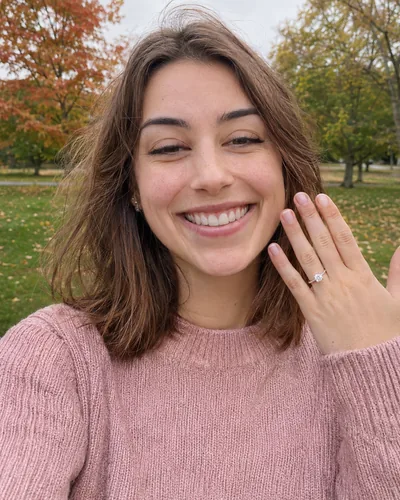 Before
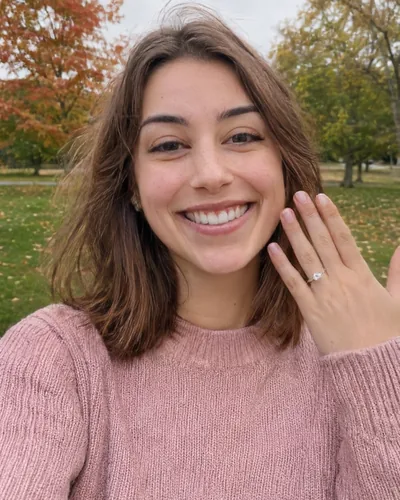 After
You said yes, someone grabbed a phone, and the photo with the ring, the light and the real smile has your eyes half shut. Big smiles close the eyes a little, and the excitement makes it worse. Before you post the announcement, here's how to get a version with your eyes open.
1. Look for another frame (free)
Your phone may have kept the moment just before or after the blink.
- iPhone: if the photo says Live, tap Edit, then the Live Photo button. Slide to a frame where your eyes are open and tap Make Key Photo. See choosing a Live Photo key photo.
- Android: with Motion Photo on, open the photo in Google Photos, swipe up, tap View all under the shots in this photo and save a better frame. See the Android guide.
2. Ask whoever took photos (free)
If a friend or a hidden photographer caught the proposal, they probably took a burst. Ask for every shot from that minute, not only the ones they picked.
3. Open your eyes with Glowly
If every frame has the blink, retouch the one you love.
- Open app.glow.ly and choose the photo. It works in any phone or computer browser.
- Auto runs first. If your eyes are still closed or half-closed, tap Eyes and turn the dial toward Open.
- Press and hold the photo to compare with the original, then save it.
Only your eyes and the skin around them change. The ring, your hand, your smile and the background stay as they were. If the photo is of both of you, Glowly retouches one face per edit, so pick the frame where your partner looks best and fix yours.
Get the shot for the announcement
- Ask for a few photos in a row instead of one.
- Smile with your mouth first, then relax your eyes; a forced wide smile closes them more.
- Face soft light, such as shade or an overcast sky, rather than the sun.
More tips in how to stop blinking in photos and half-closed eyes in photos.
Can I fix closed eyes in an engagement photo for free?
Yes, if your phone saved more than one frame: a Live Photo on iPhone or a motion photo on Android. Pick a frame where your eyes are open. If every frame has the blink, you need a retouch.
Will the ring or my hand change?
No. Glowly only redraws your eyes and the skin around them. The ring, your hand and the background stay pixel for pixel the same.
Will it still look like me?
Yes. Your eye shape, color and eyelids come from your own face, and your smile stays as it was.
How much does it cost?
Previews in the web editor cost nothing. 3 full-size saves cost $1.99. In the iPhone app your first 2 saves are free.
What happens to my photo?
Your original is never changed. Originals and unsaved edits are deleted from our servers after 7 days. See the privacy policy.
Read more
- How to stop blinking in photosWhy you always seem to blink in photos, what photographers do about it, and how to fix a blink in a photo you already have.
- Why your eyes look half closed in photos, and how to fix itSquinting, sleepy-looking or half-closed eyes in photos have a few simple causes. Here's how to avoid them, and how to fix a photo where it already happened.
- How to pick a different frame from a Live Photo on iPhoneBlinked or looked away in a Live Photo? Choose a better frame as the key photo in a few taps, and know when that trick isn't enough.
Fix something else
- Fix closed eyes in a photoBlinked in the one good photo? Open your eyes in the photo you already have. Only your eyes change; the light, the room and your expression stay as they were.
- Fix closed eyes in a photo on AndroidMost Android phones can't open closed eyes, but there are a few ways to fix a blink, from a motion photo frame to Best Take on Pixel and Best Face on Galaxy.
- Fix closed eyes in a Christmas photoHalf-closed eyes in the Christmas photo you wanted to send? Pick another frame if you have one, or open your eyes in the photo you took. The tree, the lights and your smile stay the same.
- Fix closed eyes in a concert photoEyes shut in your best photo from the concert? Check for another frame, or open your eyes in the photo you have. The stage, the lights and your laugh stay the same.
- Fix closed eyes in a game day photoEyes shut mid-laugh in your tailgate or game day photo? Check for another frame, or open your eyes in the photo you have. The stadium, the crowd and your laugh stay the same.
- Fix closed eyes in a group photoBlinked in the group photo where everyone else looks great? Open your own eyes in that photo. Everyone else, and everything around you, stays exactly as it was.
- Fix closed eyes in a photo on iPhoneThe iPhone Photos app can't open closed eyes, but there are three ways to fix a blink on iPhone, two of them free. Here's which to try first.
- Fix closed eyes in a selfieBlinked in the selfie you liked best? Pick another frame if you have one, or open your eyes in the photo you took. Your smile and the background stay as they were.
- Fix closed eyes in a ski trip photoEyes shut against the snow glare in your best photo from the mountain? Check for another frame, or open your eyes in the photo you have. The snow, the lifts and your smile stay the same.
- Fix closed eyes in a Thanksgiving photoBlinked in the one good photo from Thanksgiving dinner? Check for another frame first, or open your eyes in the photo you have. The table, the candles and your smile stay the same.
- Fix closed eyes in a vacation photoBlinked in the best photo from your trip? You can't go back for a retake, but you can open your eyes in the photo you have. The view, the light and your smile stay the same.
- Fix a dark face in a backlit photoSunset behind you and your face came out dark? Light your face and keep the sunset. Your expression and hair stay as they were.
- Fix a forced smile in a photoA stiff, held-too-long smile can make a good photo look awkward. Soften it into a natural one in the photo you already have, and keep everything else.
- Fix half-closed eyes in a photoEyes caught halfway through a blink, or squinting in the sun? Open them a little in the photo you already have. Only your eyes change; the light, the place and your smile stay as they were.
- Fix eyes not looking at the cameraGreat smile, but your eyes were on something else? Turn your eyes to the camera in the photo you already have. Your face, smile and background stay as they were.
- Fix closed eyes in a graduation photoBlinked in your graduation photo? Open your eyes in the photo you already have, from the ceremony, the campus or the family shot. Only your eyes change.
- Fix closed eyes when you laughed in a photoLaughed so hard your eyes shut in the best photo of the night? Open your eyes and keep the laugh. Your smile, the light and the background stay as they were.
- Fix closed eyes in a night photoBlinked in the one good photo from a night out? Open your eyes in the photo you already have. Your smile, the city lights and the background stay as they were.
- Fix closed eyes in a wedding photoBlinked in a wedding photo? Ask the photographer for the next frame, or open your own eyes in the photo you have. Everyone else and the moment stay exactly as they were.
- Fix your head tilted down in a photoChin down and looking up at the camera, so you look tired or moody? Lift your chin a little in the photo you already have. Your face, hair and background stay the same.
- Fix looking angry in a photoLook annoyed in a photo when you felt fine? Relax lowered brows in the photo you already have. Your face, the light and the background stay as they were.
- Add a smile to a photoLooked serious in a photo you otherwise love? Add a natural, closed or open smile to your own face, and leave the rest of the photo untouched.
- Fix squinting in a photoSquinted in the sun in a photo you otherwise like? Open your eyes a little in the photo you already have. The sunlight, the place and your smile stay as they were.
- Fix a tight-lipped smile in a photoPressed your lips together when someone said "smile"? Turn a tight, closed smile into your natural one in the photo you already have. Everything else stays the same.
- Fix looking tired in a photoLook tired in a photo taken late or in dim light? Open heavy eyes a little and lift the light on your face, in the photo you already have.
- Make your dating profile photo betterYour best dating photo is often one you already have, minus a blink or a stiff smile. Fix the moment, keep the person, and put your best real photo first.