
Fix a dark face in a backlit photo
Sunset behind you and your face came out dark? Light your face and keep the sunset. Your expression and hair stay as they were.
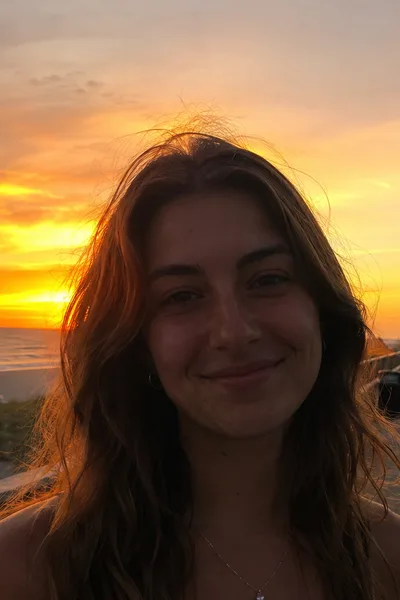 Before
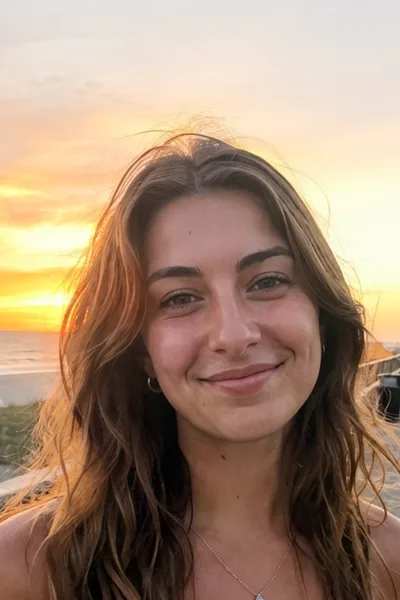 After
To fix a dark face in a backlit photo, try lifting the shadows in your phone's editor first. If that makes the photo look flat or grainy, relight the face with a tool such as Glowly, which lights your face and keeps the sunset behind you.
A camera can't expose for a bright sky and a face in shadow at the same time. When the sun or a window is behind you, the phone keeps the sky and lets your face go dark. It's the most common problem with sunset, beach and window-seat photos, and usually the moment is gone by the time anyone notices.
Free options first
- Shadows in Photos. On iPhone, tap Edit, then Adjust, and raise Shadows or Brilliance. This works for a slightly dark face. Pushed far, it washes out the sky and adds grain.
- HDR or a Live Photo. Some phones keep more detail in the shadows than you see at first. Try the Live Photo frames or the auto-enhance button.
- Next time: turn so the light falls on your face, or tap your face on the screen before taking the photo so the camera exposes for you.
How to fix it with Glowly
- Open the web editor in any phone or computer browser, or Glowly on iPhone, and choose the photo.
- Tap Body & scene, then Light. It takes about 20 seconds.
- Press and hold the photo to compare with the original, then save.
Light redraws the light on you, not just the brightness of the pixels, so your face looks lit rather than brightened. The sunset stays, though it can come out a little softer as the light evens out. Because it redraws the light, check your face at full size before you save.
Getting it to look right
- Keep the mood. A sunset photo should still feel like a sunset. A face lit like a studio portrait in front of an orange sky looks pasted in.
- Zoom in on the face. Check your eyes, skin and hairline at full size.
- Compare with the original. Press and hold to make sure it still looks like you.
Why is my face dark in photos with the sun behind me?
The camera exposes for the brightest part of the scene, the sky, so anything in shadow comes out dark. Our guide on brightening a dark photo of your face explains more.
Can I fix it for free?
Often a little. Raising Shadows in your phone's editor helps with a slightly dark face. For a face in deep shadow, Glowly is free to preview. In the web editor there's nothing to install and no account needed to try; 1 full-size save costs $0.99 and 3 cost $1.99. On iPhone your first 2 saves are free.
Will it change my face?
Light changes the light on you, not your features. Because it redraws the image, compare with the original and check the details before you save.
What happens to my photo?
Your original is never changed. Originals and unsaved edits are deleted from our servers after 7 days. See the privacy policy.
Read more
- How to brighten a dark photo of your faceYour face is in shadow but the photo is otherwise good? Free ways to brighten it on iPhone, why it often looks worse, and how to fix the light itself.
- How to take a good selfie: light, angle and a real expressionA good selfie is mostly light, distance and timing. Here is how to take one that looks like you on a good day, with the phone you already have.
- How to look natural in photos when you feel awkward on cameraWhy you look stiff in photos even when you feel fine, and practical ways to look relaxed and like yourself, from posture and hands to where to look.
Fix something else
- Fix closed eyes in a photoBlinked in the one good photo? Open your eyes in the photo you already have. Only your eyes change; the light, the room and your expression stay as they were.
- Fix closed eyes in a group photoBlinked in the group photo where everyone else looks great? Open your own eyes in that photo. Everyone else, and everything around you, stays exactly as it was.
- Fix closed eyes in a photo on iPhoneThe iPhone Photos app can't open closed eyes, but there are three ways to fix a blink on iPhone, two of them free. Here's which to try first.
- Fix a forced smile in a photoA stiff, held-too-long smile can make a good photo look awkward. Soften it into a natural one in the photo you already have, and keep everything else.
- Fix half-closed eyes in a photoEyes caught halfway through a blink, or squinting in the sun? Open them a little in the photo you already have. Only your eyes change; the light, the place and your smile stay as they were.
- Fix eyes not looking at the cameraGreat smile, but your eyes were on something else? Turn your eyes to the camera in the photo you already have. Your face, smile and background stay as they were.
- Fix closed eyes in a graduation photoBlinked in your graduation photo? Open your eyes in the photo you already have, from the ceremony, the campus or the family shot. Only your eyes change.
- Fix closed eyes when you laughed in a photoLaughed so hard your eyes shut in the best photo of the night? Open your eyes and keep the laugh. Your smile, the light and the background stay as they were.
- Fix closed eyes in a night photoBlinked in the one good photo from a night out? Open your eyes in the photo you already have. Your smile, the city lights and the background stay as they were.
- Fix closed eyes in a wedding photoBlinked in a wedding photo? Ask the photographer for the next frame, or open your own eyes in the photo you have. Everyone else and the moment stay exactly as they were.
- Fix your head tilted down in a photoChin down and looking up at the camera, so you look tired or moody? Lift your chin a little in the photo you already have. Your face, hair and background stay the same.
- Fix looking angry in a photoLook annoyed in a photo when you felt fine? Relax lowered brows in the photo you already have. Your face, the light and the background stay as they were.
- Add a smile to a photoLooked serious in a photo you otherwise love? Add a natural, closed or open smile to your own face, and leave the rest of the photo untouched.
- Fix squinting in a photoSquinted in the sun in a photo you otherwise like? Open your eyes a little in the photo you already have. The sunlight, the place and your smile stay as they were.
- Fix a tight-lipped smile in a photoPressed your lips together when someone said "smile"? Turn a tight, closed smile into your natural one in the photo you already have. Everything else stays the same.
- Fix looking tired in a photoLook tired in a photo taken late or in dim light? Open heavy eyes a little and lift the light on your face, in the photo you already have.
- Make your dating profile photo betterYour best dating photo is often one you already have, minus a blink or a stiff smile. Fix the moment, keep the person, and put your best real photo first.