
Fix squinting in a photo
Squinted in the sun in a photo you otherwise like? Open your eyes a little in the photo you already have. The sunlight, the place and your smile stay as they were.
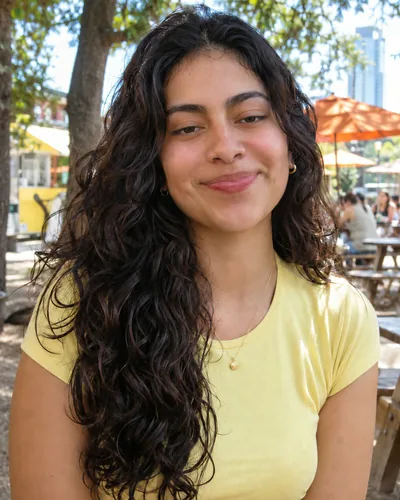 Before
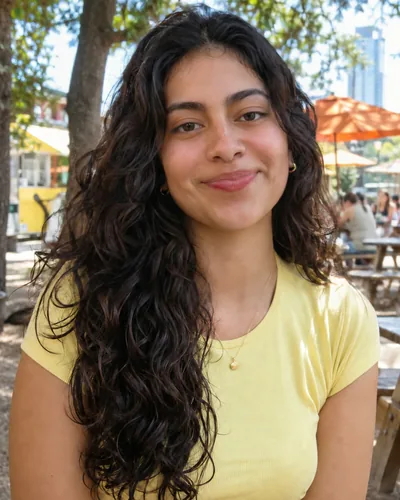 After
To fix squinting in a photo, check for a better frame first (a Live Photo or a burst), and if there isn't one, open your eyes a little with a retouching tool such as Glowly, which changes only your eyes and keeps the sunlight, the place and your smile. Bright sun makes almost everyone squint, so the best light of the day often gives you the sleepiest eyes.
Free options first
- Live Photo. On iPhone, tap Edit, then the Live Photo button, and slide to a frame where your eyes are more open. Set it as the key photo. Our guide to choosing a different Live Photo frame shows the steps.
- The burst. If someone took several in a row, look at the frames before and after. People often open their eyes for a moment right after the countdown.
- Crop or go wider. In a full-length or group photo, squinting barely shows. A small crop that puts less weight on the face can be enough.
How to fix squinting with Glowly
- Open the web editor in any phone or computer browser, or Glowly on iPhone, and choose the photo.
- Auto runs first. It sees the narrowed eyes and opens them, along with anything else the photo needs.
- To adjust, tap Eyes and turn the dial. Squinting usually needs only a small change.
- Press and hold the photo to compare with the original, then save.
Only your eyes and the skin around them are redrawn. The sun on your face, your hair, your clothes and the background stay the same.
Getting it to look right
- Keep a little squint. In bright sun, wide-open eyes look odd, because everyone else in that light narrows their eyes too. Open them until you look awake, then stop.
- Keep the smile. A real smile narrows the eyes. If you open them all the way, a laugh can start to look posed.
- Check at full size. Zoom in on the eyes before saving, especially in strong backlight.
Next time
Turn so the sun is behind you or to the side, and keep your eyes closed until "three". Shade under a tree or an awning gives softer light and open eyes. Our guide on why eyes look half closed in photos explains more causes.
Why do I squint in every outdoor photo?
Bright light makes the eyes narrow to protect themselves, and it happens before you notice. Smiling narrows them further. Facing away from the sun or standing in open shade usually fixes it.
Can I fix squinting for free?
Yes, if a Live Photo or a burst has a better frame. Retouching in Glowly is free to preview. In the web editor there's nothing to install and no account needed to try; 3 full-size saves cost $1.99. On iPhone your first 2 saves are free.
Will it still look like me?
Yes. The shape, color and eyelids of your eyes come from your own face, and you choose how far to open them.
What happens to my photo?
Your original is never changed. Originals and unsaved edits are deleted from our servers after 7 days. See the privacy policy.
Read more
- Why your eyes look half closed in photos, and how to fix itSquinting, sleepy-looking or half-closed eyes in photos have a few simple causes. Here's how to avoid them, and how to fix a photo where it already happened.
- How to look natural in photos when you feel awkward on cameraWhy you look stiff in photos even when you feel fine, and practical ways to look relaxed and like yourself, from posture and hands to where to look.
- How to take a good selfie: light, angle and a real expressionA good selfie is mostly light, distance and timing. Here is how to take one that looks like you on a good day, with the phone you already have.
Fix something else
- Fix closed eyes in a photoBlinked in the one good photo? Open your eyes in the photo you already have. Only your eyes change; the light, the room and your expression stay as they were.
- Fix closed eyes in a group photoBlinked in the group photo where everyone else looks great? Open your own eyes in that photo. Everyone else, and everything around you, stays exactly as it was.
- Fix closed eyes in a photo on iPhoneThe iPhone Photos app can't open closed eyes, but there are three ways to fix a blink on iPhone, two of them free. Here's which to try first.
- Fix a forced smile in a photoA stiff, held-too-long smile can make a good photo look awkward. Soften it into a natural one in the photo you already have, and keep everything else.
- Fix half-closed eyes in a photoEyes caught halfway through a blink, or squinting in the sun? Open them a little in the photo you already have. Only your eyes change; the light, the place and your smile stay as they were.
- Fix closed eyes in a graduation photoBlinked in your graduation photo? Open your eyes in the photo you already have, from the ceremony, the campus or the family shot. Only your eyes change.
- Fix closed eyes in a wedding photoBlinked in a wedding photo? Ask the photographer for the next frame, or open your own eyes in the photo you have. Everyone else and the moment stay exactly as they were.
- Add a smile to a photoLooked serious in a photo you otherwise love? Add a natural, closed or open smile to your own face, and leave the rest of the photo untouched.
- Fix looking tired in a photoLook tired in a photo taken late or in dim light? Open heavy eyes a little and lift the light on your face, in the photo you already have.
- Make your dating profile photo betterYour best dating photo is often one you already have, minus a blink or a stiff smile. Fix the moment, keep the person, and put your best real photo first.