
Why your eyes look half closed in photos, and how to fix it
Squinting, sleepy-looking or half-closed eyes in photos have a few simple causes. Here's how to avoid them, and how to fix a photo where it already happened.
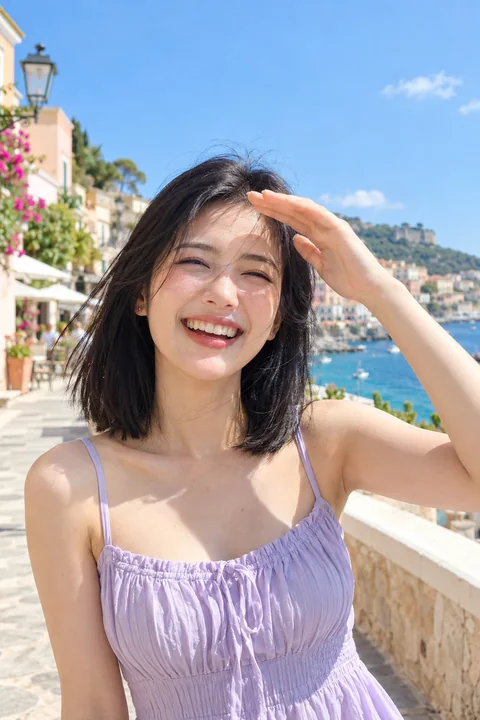
Half-closed eyes are sneakier than a full blink. You don't notice them while the photo is taken, the photo looks fine on the small preview, and then you zoom in and look tired, bored or a little sleepy. It happens to almost everyone, and it's usually not your eyes. It's the light and the moment.
Why it happens
- Bright light in your face. Sun or a bright lamp in front of you makes you squint without noticing.
- The end of a blink. The camera caught your eyelids on their way up or down.
- A big smile. A real laugh pushes your cheeks up and narrows your eyes. That's part of a genuine smile, but on some faces it reads as squinting.
- The camera angle. A camera held high makes you look down at it, and your upper eyelids cover more of your eyes.
- Being tired. Heavy eyelids show more on camera than in the mirror.
How to avoid it
- Turn so the light comes from the side. You'll stop squinting and your face gets more shape.
- Find shade on sunny days. Open shade, like the shadow of a building, gives soft, even light and open eyes.
- Lift your eyes slightly. Look at a point just above the lens, or raise your chin a touch. Don't widen your eyes on purpose; it reads as startled.
- Take several shots. With a burst or a few photos in a row, at least one usually catches your eyes fully open.
- Keep the camera at eye level or a little above, not far above.
How to fix it in a photo you already have
First, check the other frames. On iPhone, a Live Photo lets you choose a different frame, and the one just before or after may have your eyes open.
If not, a retouch can open your eyes a little. In Glowly, tap Eyes and turn the dial from As is toward Open. For half-closed eyes you rarely need the full way: stop as soon as you look awake. Opening them too much over a big smile looks strange, because a real laugh narrows your eyes.
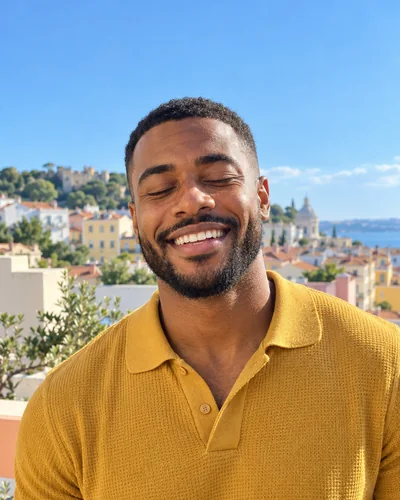 Before
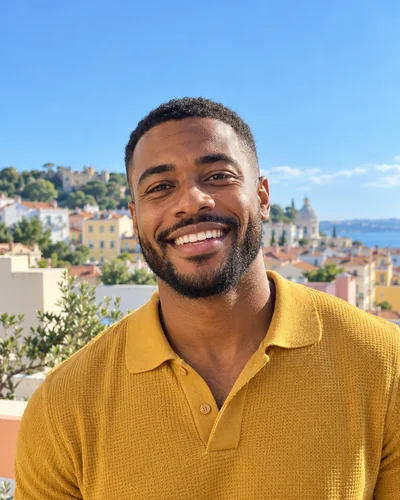 After
AfterOnly your eyes and the skin around them change. Your eye shape, color and eyelids stay yours, and the rest of the photo stays exactly as it was. You can try it in the web editor on any photo; there's a short guide on the closed eyes page too.
A note on squinting and smiling
Narrowed eyes in a big laugh are not a flaw. They're a large part of why a real smile looks real; our guide to a natural smile in photos explains why. If you love the laugh and only the eyes bother you, open them slightly, not fully.
Fix this in a photo
- Fix closed eyes in a photoBlinked in the one good photo? Open your eyes in the photo you already have. Only your eyes change; the light, the room and your expression stay as they were.
Keep reading
- How to brighten a dark photo of your faceYour face is in shadow but the photo is otherwise good? Free ways to brighten it on iPhone, why it often looks worse, and how to fix the light itself.
- How to fix a photo without changing your faceMany AI photo editors redraw the whole photo, and your face drifts with it. Here's how to tell a tool that fixes one thing from one that regenerates everything.
- How to fix eyes not looking at the camera in a photoLooked at the screen, at a friend or just past the lens? Why it happens, how to avoid it, and how to fix where your eyes look in a photo you already have.