
Fix closed eyes in a photo on Android
Most Android phones can't open closed eyes, but there are a few ways to fix a blink, from a motion photo frame to Best Take on Pixel and Best Face on Galaxy.
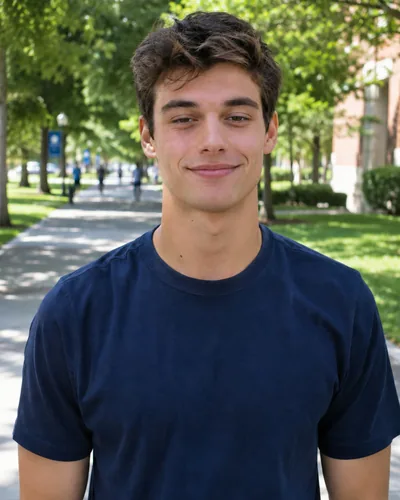 Before
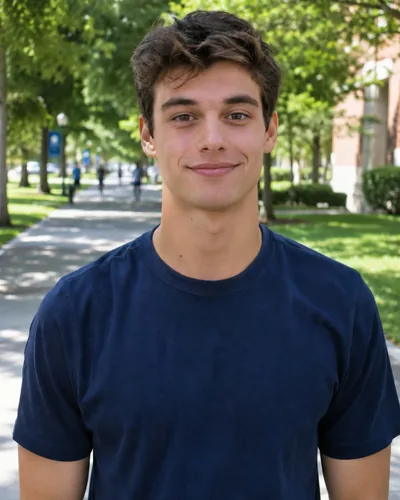 After
Android phones don't share one gallery app, so what you can do about a blink depends on your phone. Try these in order: the first ones are free and keep your photo exactly as it was taken.
1. Pick another frame from the motion photo (free)
If Motion Photo (Google) or Motion photo (Samsung) was on, the photo holds a second or two of frames, and one of them may have your eyes open.
- Google Photos: open the photo and swipe up. Under the shots in this photo, tap View all, move to a frame where your eyes are open and tap Save copy.
- Samsung Gallery: open the photo, tap View motion photo and pause on a better frame, then save it as a still. The exact menu names vary between One UI versions.
The saved frame is a little softer than the original, which is fine for sharing.
2. Use Best Take on Pixel or Best Face on Galaxy (free)
These tools swap in a face from a similar photo taken a moment before or after. They don't open eyes; they need a frame where your eyes were already open.
- Pixel 8 and newer: in Google Photos, open one photo from a run of similar shots, tap Edit, then Actions, then Best Take.
- Galaxy S23 and newer on One UI 7, and some A-series phones: take the photo with Motion photo on, open it in Gallery, swipe up and choose Best face.
3. Check the photos next to it (free)
If you or a friend took several in a row, scroll through them. One may already have your eyes open.
4. Open your eyes with Glowly
If every frame has the blink, retouch the photo you have. Glowly has no Android app, but the web editor works in Chrome on any Android phone, with nothing to install.
- Open app.glow.ly in Chrome and choose the photo.
- Auto runs first and opens your eyes, along with anything else the photo needs.
- To fine-tune, tap Eyes and turn the dial. Press and hold the photo to compare with the original.
- Save the photo to your phone.
Only your eyes and the skin around them change. Your face, hair, clothes and everything behind you stay as they were. It works best when your eyes are half shut or mid-blink. Fully closed eyes can be opened too, but the result looks more natural when some of the eye shows.
Can Google Photos fix closed eyes?
Not directly. On Pixel 8 and newer, Best Take can swap in your face from a similar photo where your eyes were open. On any phone, Google Photos can save another frame of a motion photo. Neither can open eyes that are closed in every frame.
Does Samsung have a closed eyes fix?
Galaxy phones with Best face (Galaxy S23 and newer on One UI 7, and some A-series phones) can pick a better face from a motion photo. It needs a frame where your eyes were open; it doesn't open closed eyes.
Is there a Glowly app for Android?
Not yet. The web editor at app.glow.ly works in Chrome and other Android browsers, with nothing to install and no account needed to try.
How much does it cost?
Previews in the web editor cost nothing. 3 full-size saves cost $1.99.
What happens to my photo?
Your original is never changed. Originals and unsaved edits are deleted from our servers after 7 days. See the privacy policy.
Read more
- How to fix closed eyes in a photoSomeone blinked in the one photo where everything else is right. Here are the ways to fix closed eyes on iPhone, from Live Photos to AI retouching, and what to avoid.
- How to stop blinking in photosWhy you always seem to blink in photos, what photographers do about it, and how to fix a blink in a photo you already have.
- How to open closed eyes in Photoshop, and faster waysThe classic Photoshop method for fixing closed eyes, step by step, plus when a phone or browser fix gets you there in a minute instead.
Fix something else
- Fix closed eyes in a photoBlinked in the one good photo? Open your eyes in the photo you already have. Only your eyes change; the light, the room and your expression stay as they were.
- Fix closed eyes in a group photoBlinked in the group photo where everyone else looks great? Open your own eyes in that photo. Everyone else, and everything around you, stays exactly as it was.
- Fix closed eyes in a photo on iPhoneThe iPhone Photos app can't open closed eyes, but there are three ways to fix a blink on iPhone, two of them free. Here's which to try first.
- Fix closed eyes in a selfieBlinked in the selfie you liked best? Pick another frame if you have one, or open your eyes in the photo you took. Your smile and the background stay as they were.
- Fix closed eyes in a vacation photoBlinked in the best photo from your trip? You can't go back for a retake, but you can open your eyes in the photo you have. The view, the light and your smile stay the same.
- Fix a dark face in a backlit photoSunset behind you and your face came out dark? Light your face and keep the sunset. Your expression and hair stay as they were.
- Fix a forced smile in a photoA stiff, held-too-long smile can make a good photo look awkward. Soften it into a natural one in the photo you already have, and keep everything else.
- Fix half-closed eyes in a photoEyes caught halfway through a blink, or squinting in the sun? Open them a little in the photo you already have. Only your eyes change; the light, the place and your smile stay as they were.
- Fix eyes not looking at the cameraGreat smile, but your eyes were on something else? Turn your eyes to the camera in the photo you already have. Your face, smile and background stay as they were.
- Fix closed eyes in a graduation photoBlinked in your graduation photo? Open your eyes in the photo you already have, from the ceremony, the campus or the family shot. Only your eyes change.
- Fix closed eyes when you laughed in a photoLaughed so hard your eyes shut in the best photo of the night? Open your eyes and keep the laugh. Your smile, the light and the background stay as they were.
- Fix closed eyes in a night photoBlinked in the one good photo from a night out? Open your eyes in the photo you already have. Your smile, the city lights and the background stay as they were.
- Fix closed eyes in a wedding photoBlinked in a wedding photo? Ask the photographer for the next frame, or open your own eyes in the photo you have. Everyone else and the moment stay exactly as they were.
- Fix your head tilted down in a photoChin down and looking up at the camera, so you look tired or moody? Lift your chin a little in the photo you already have. Your face, hair and background stay the same.
- Fix looking angry in a photoLook annoyed in a photo when you felt fine? Relax lowered brows in the photo you already have. Your face, the light and the background stay as they were.
- Add a smile to a photoLooked serious in a photo you otherwise love? Add a natural, closed or open smile to your own face, and leave the rest of the photo untouched.
- Fix squinting in a photoSquinted in the sun in a photo you otherwise like? Open your eyes a little in the photo you already have. The sunlight, the place and your smile stay as they were.
- Fix a tight-lipped smile in a photoPressed your lips together when someone said "smile"? Turn a tight, closed smile into your natural one in the photo you already have. Everything else stays the same.
- Fix looking tired in a photoLook tired in a photo taken late or in dim light? Open heavy eyes a little and lift the light on your face, in the photo you already have.
- Make your dating profile photo betterYour best dating photo is often one you already have, minus a blink or a stiff smile. Fix the moment, keep the person, and put your best real photo first.