
Fix closed eyes when you laughed in a photo
Laughed so hard your eyes shut in the best photo of the night? Open your eyes and keep the laugh. Your smile, the light and the background stay as they were.
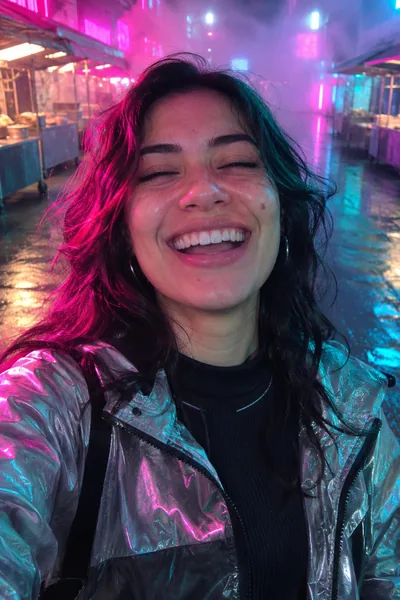 Before
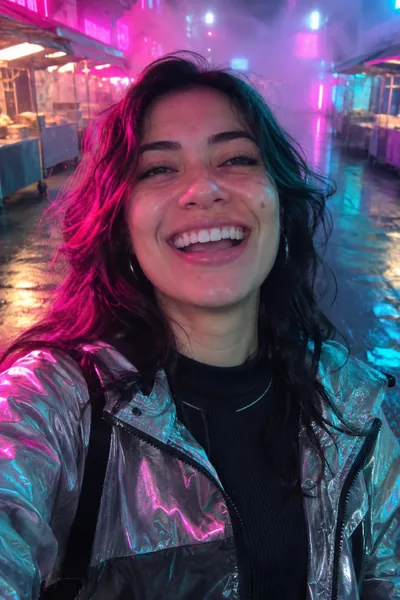 After
To fix closed eyes in a photo where you were laughing, look for a better frame in a Live Photo or a burst first. If there isn't one, open the eyes just enough with a retouching tool such as Glowly, which changes your eyes and keeps the laugh, the light and the background as they were.
A real laugh is the best thing a photo can catch, and it's also the moment your eyes are most likely to close. Your cheeks lift, your eyes narrow, and for a split second they shut. That's why the funniest photo of the night is so often the one where you look asleep.
Free options first
- Live Photo. On iPhone, open the photo, tap Edit, then the Live Photo button, and slide through the frames. A laugh lasts longer than a blink, so a frame a moment earlier or later often has your eyes open. Set it as the key photo.
- The burst. If someone took several in a row, check the frames on either side.
- Ask for the next one. If the moment is still going, the second laugh is often just as good.
How to fix it with Glowly
- Open the web editor in any phone or computer browser, or Glowly on iPhone, and choose the photo.
- Auto runs first. It sees the closed eyes and opens them, and leaves your smile alone.
- To adjust, tap Eyes and turn the dial a little at a time.
- Press and hold the photo to compare with the original, then save.
Don't open them all the way
This is the one fix where less is more. When people really laugh, their eyes narrow, so wide-open eyes above a big laugh look odd, as if the top and bottom of the face come from different photos.
- Aim for "eyes open, still laughing". Stop as soon as you can see your eyes. A slight squint is what a real laugh looks like.
- Check both eyes. If one was more closed than the other, make sure they end up matching.
- Watch colored light. At a party or a night market, the new eyes pick up the color around them. Zoom in and check them before you save.
If your eyes were only half shut, read how to fix half-closed eyes instead.
Why do my eyes close when I laugh in photos?
A real laugh lifts your cheeks and narrows your eyes, and they often shut for a moment at the peak. It's normal, and it's why laughing photos have so many blinks.
Will opening my eyes ruin the laugh?
Not if you stop early. Glowly changes your eyes and leaves your mouth and cheeks as they were, and you choose how far the eyes open. A slight squint keeps the laugh looking real.
Can I fix it for free?
Sometimes. A Live Photo or a burst may already hold a frame with your eyes open. If not, Glowly is free to preview. In the web editor there's nothing to install and no account needed to try; 3 full-size saves cost $1.99. On iPhone your first 2 saves are free.
What happens to my photo?
Your original is never changed. Originals and unsaved edits are deleted from our servers after 7 days. See the privacy policy.
Read more
- How to fix closed eyes in a photoSomeone blinked in the one photo where everything else is right. Here are the ways to fix closed eyes on iPhone, from Live Photos to AI retouching, and what to avoid.
- How to smile naturally in photos (and fix a forced smile)Why camera smiles look forced, how to get a real one while the photo is being taken, and how to fix a stiff smile in a photo you already have.
- How to stop blinking in photosWhy you always seem to blink in photos, what photographers do about it, and how to fix a blink in a photo you already have.
Fix something else
- Fix closed eyes in a photoBlinked in the one good photo? Open your eyes in the photo you already have. Only your eyes change; the light, the room and your expression stay as they were.
- Fix closed eyes in a group photoBlinked in the group photo where everyone else looks great? Open your own eyes in that photo. Everyone else, and everything around you, stays exactly as it was.
- Fix closed eyes in a photo on iPhoneThe iPhone Photos app can't open closed eyes, but there are three ways to fix a blink on iPhone, two of them free. Here's which to try first.
- Fix a forced smile in a photoA stiff, held-too-long smile can make a good photo look awkward. Soften it into a natural one in the photo you already have, and keep everything else.
- Fix half-closed eyes in a photoEyes caught halfway through a blink, or squinting in the sun? Open them a little in the photo you already have. Only your eyes change; the light, the place and your smile stay as they were.
- Fix closed eyes in a graduation photoBlinked in your graduation photo? Open your eyes in the photo you already have, from the ceremony, the campus or the family shot. Only your eyes change.
- Fix closed eyes in a night photoBlinked in the one good photo from a night out? Open your eyes in the photo you already have. Your smile, the city lights and the background stay as they were.
- Fix closed eyes in a wedding photoBlinked in a wedding photo? Ask the photographer for the next frame, or open your own eyes in the photo you have. Everyone else and the moment stay exactly as they were.
- Fix your head tilted down in a photoChin down and looking up at the camera, so you look tired or moody? Lift your chin a little in the photo you already have. Your face, hair and background stay the same.
- Fix looking angry in a photoLook annoyed in a photo when you felt fine? Relax lowered brows in the photo you already have. Your face, the light and the background stay as they were.
- Add a smile to a photoLooked serious in a photo you otherwise love? Add a natural, closed or open smile to your own face, and leave the rest of the photo untouched.
- Fix squinting in a photoSquinted in the sun in a photo you otherwise like? Open your eyes a little in the photo you already have. The sunlight, the place and your smile stay as they were.
- Fix a tight-lipped smile in a photoPressed your lips together when someone said "smile"? Turn a tight, closed smile into your natural one in the photo you already have. Everything else stays the same.
- Fix looking tired in a photoLook tired in a photo taken late or in dim light? Open heavy eyes a little and lift the light on your face, in the photo you already have.
- Make your dating profile photo betterYour best dating photo is often one you already have, minus a blink or a stiff smile. Fix the moment, keep the person, and put your best real photo first.