
How to fix closed eyes in a photo
Someone blinked in the one photo where everything else is right. Here are the ways to fix closed eyes on iPhone, from Live Photos to AI retouching, and what to avoid.
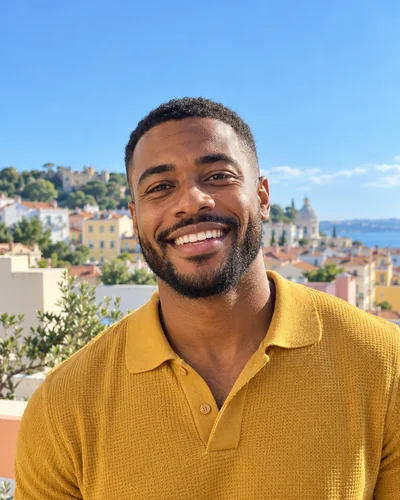
You finally get the shot: good light, good angle, a real laugh. Then you zoom in and your eyes are closed. A blink lasts a fraction of a second, but it lands in a surprising number of photos, especially group shots and anything taken with a flash.
The good news is that a blink is one of the easiest things to fix now. Here are the options, from free and quick to the most reliable.
1. Check for a Live Photo first
If the photo was taken on an iPhone with Live Photos on, the camera also captured about a second and a half of frames around the moment you pressed the shutter. One of them often has your eyes open.
- Open the photo in Photos and tap Edit.
- Tap the Live Photo button (the concentric circles).
- Drag the frame slider until your eyes are open, then tap Make Key Photo.
The key photo is a frame from the video, so it is a little softer than the original still. For a profile picture or a social post it is usually fine. It also only helps if the moment you wanted lasted longer than the blink.
2. Use another photo from the burst
If you took several photos in a row, look through them before editing anything. In a group photo, the version where everyone has their eyes open may not exist, but the one where you do probably does. Some editors can blend faces from two photos of the same scene. This works well when the photos were taken from the same spot within a second or two, and badly when the head moved.
3. Open the eyes with AI retouching
When there is no other frame, an AI retouch can redraw your open eyes in the photo you already have. This is what an eyes tool in an app like Glowly does: it finds your face, opens the eyes, and leaves the rest of the photo as it was.
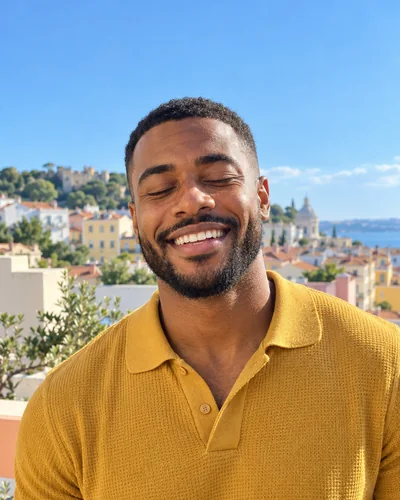 BeforeAfter
What separates a good result from an uncanny one:
- The eyes should still look like yours. Eye shape, color and the crease of your eyelids matter more than you would think. A good retouch keeps them.
- The expression should match. If you were laughing, your eyes were probably narrowed. Wide-open eyes over a big laugh look strange. A slightly open, smiling eye reads as natural.
- Nothing else should change. Your hair, skin, background and clothes should be pixel for pixel the same. If the tool redraws the whole photo, small things drift and the result looks generated.
4. Paste eyes in manually
The old way: copy the eyes from another photo of yourself and blend them in with a photo editor. It can work if you are patient and the head angle and light match closely. In practice it is slow, and mismatched light or angle is the most common reason a fixed photo looks off.
How to avoid blinks next time
- Take a short burst. Hold the shutter or take three or four photos in a row. Blinks are short, so at least one frame almost always has open eyes.
- Close your eyes, then open them on "three". Photographers use this with groups: everyone closes their eyes and opens them on the count, so nobody blinks at the moment of the shot.
- Avoid looking straight at a bright light. Squinting into the sun or a flash makes blinks and half-closed eyes far more likely. Put the light to your side.
- Keep Live Photos on. It costs a little storage and gives you the frame-picking option above for free.
Is it OK to fix closed eyes in a dating profile photo?
Yes. Opening your eyes in a photo where you blinked shows what you actually look like. That is different from changing your face, body or age, which misleads people. The rule of thumb we follow: fix the moment, not the person. You can read more in Is it OK to edit your dating profile photos?
Fix this in a photo
- Fix closed eyes in a photoBlinked in the one good photo? Open your eyes in the photo you already have. Only your eyes change; the light, the room and your expression stay as they were.
Keep reading
- The best dating profile photos, and how to get themWhich photos to use on Hinge, Tinder and Bumble, which to leave out, and how to get good ones from your camera roll without a photographer.
- How to take a good selfie: light, angle and a real expressionA good selfie is mostly light, distance and timing. Here is how to take one that looks like you on a good day, with the phone you already have.
- Is it OK to edit your dating profile photos?Where the line is between fixing a photo and misleading people, with simple rules for what's fair to retouch on a dating profile and what isn't.