
LinkedIn and headshot photos: how to get a good one without a photographer
What a good LinkedIn profile photo or work headshot looks like, how to take one at home with a phone, and what you can and shouldn't change afterwards.
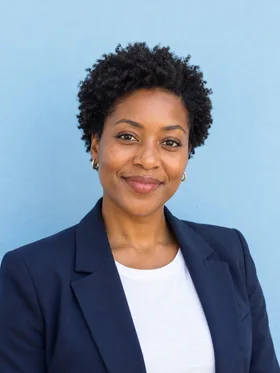
Your LinkedIn photo is a small circle that people see next to your name in search results, messages and comments. It has one job: show clearly what you look like, in a way that makes you easy to approach. You don't need a studio for that. You need a plain background, good light and about twenty minutes.
What a good headshot looks like
- Your face fills most of the frame. Head and shoulders, with a little space above your hair. In a tiny circle, a full-body photo just looks like a small person.
- Eyes to the camera, with a relaxed smile. People trust faces that look at them. A closed or slightly open smile reads as friendly and professional.
- A plain, uncluttered background. A light wall, a soft-focus office or greenery. Nothing that competes with your face.
- Clothes you'd wear to work, on a good day. Solid colors usually crop better than busy patterns.
- Recent. If people would be surprised when they meet you, the photo is too old.
How to take one at home
- Find window light. Stand facing a large window in daytime, about an arm's length from it. Turn slightly so the light is a little to one side.
- Choose the wall. Put a plain wall behind you, at least a step back so you don't cast a shadow on it.
- Set the camera at eye level. Use the back camera, which is sharper than the front one, on a stack of books or a tripod, with a 2–3 second timer. Or ask a friend.
- Shoot a lot. Twenty or thirty frames, with small changes in angle and expression. Turn your shoulders slightly away from the camera and your face back toward it.
- Crop later. Shoot a bit wider than you need; crop to head and shoulders afterwards.
If you smile with your eyes as well as your mouth, it shows. Talk to whoever is taking the photo, or think of the last thing that made you laugh. How to smile naturally in photos has more ways to get there.
What you can fix afterwards
Small, honest fixes are normal for a headshot. Photographers have always made them:
- Exposure, color and cropping. Brighten a dark photo a little, straighten it, crop to head and shoulders.
- The moment. A blink, a stiff smile or a glance just off the lens. Glowly can open your eyes, relax a smile or turn your gaze to the camera, and change nothing else.
- A stray detail. A crumb on a collar, a hair across the eye.
What you shouldn't change
- Your face shape, skin texture or age. A headshot that doesn't look like you in person costs trust the first time you meet.
- Your identity. AI headshot generators that invent a new photo from selfies often produce someone slightly different: smoother skin, a different jaw, teeth that aren't yours. It may look polished, but it isn't you.
The same rule we use for dating photos applies here: fix the moment, never the person.
A short checklist
- Head and shoulders, face filling most of the frame.
- Soft window light from the front, slightly to one side.
- Plain background a step behind you.
- Eyes to the lens, relaxed smile.
- Work clothes in solid colors.
- Taken in the last year or two.
Keep reading
- The best dating profile photos, and how to get themWhich photos to use on Hinge, Tinder and Bumble, which to leave out, and how to get good ones from your camera roll without a photographer.
- How to fix closed eyes in a photoSomeone blinked in the one photo where everything else is right. Here are the ways to fix closed eyes on iPhone, from Live Photos to AI retouching, and what to avoid.
- How to take a good selfie: light, angle and a real expressionA good selfie is mostly light, distance and timing. Here is how to take one that looks like you on a good day, with the phone you already have.