
A Facetune alternative for fixing one moment, not your face
Facetune is a full face and body editor. If you only want to fix a blink, a stiff smile or a look away and keep your face as it is, here's a simpler option, and when Facetune is still the better tool.

Facetune is one of the best-known selfie editors. It does a lot: skin smoothing, teeth whitening, reshaping, makeup, backgrounds, AI filters and more. For many people that's exactly the point.
But a lot of people open an editor with one small problem. They blinked. The smile was held too long. They were looking at the screen. They don't want a different face; they want the photo they already have, minus the bad moment. That's a different job, and it's the one Glowly is built for.
What each app is for
Facetune is a general-purpose face and body editor. You change how you look: smoother skin, a different jawline, whiter teeth, makeup, a new background. You decide how far to go, and it can go far.
Glowly fixes the moment and leaves the person. It has a short list of touches, each for a common near-miss:
- Eyes opens closed or half-closed eyes.
- Smile turns a neutral or stiff expression into a natural smile, or a laugh.
- Look turns your eyes toward the camera.
- Light, Posture and Tidy fix the scene around you.
There's no face reshaping, no skin smoothing and no slimming. That's on purpose.
Why that matters
When a tool changes a little of everything, the photo starts to look edited, and people notice even when they can't say why. When it changes only what was wrong, the photo still looks like a photo of you.
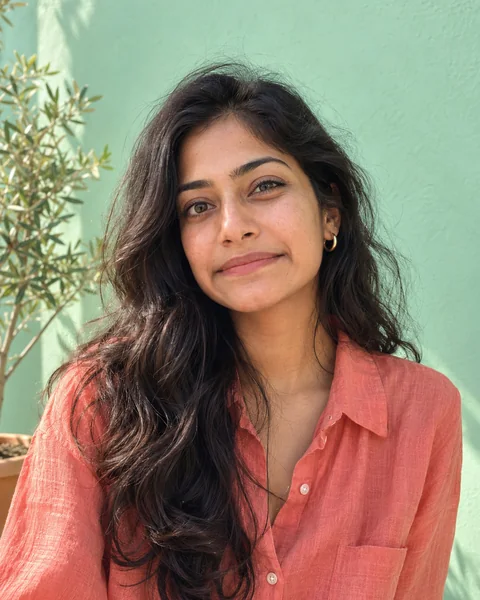 Before
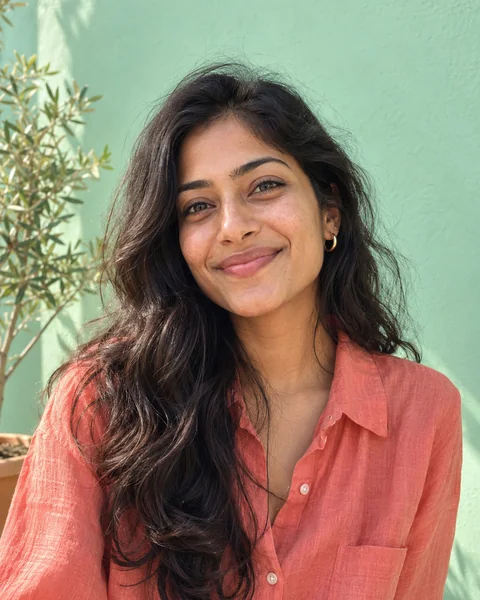 After
AfterGlowly's face touches redraw only your expression and leave the rest of the photo exactly as it was. Your skin, your face shape, your hair, the background. We think that's also the fair line for photos other people rely on, like a dating profile: fix the moment, not the person.
When Facetune is the better choice
- You want to remove a blemish, whiten teeth or try makeup.
- You want creative edits: new backgrounds, filters, styles.
- You edit lots of photos and want one app for everything.
When Glowly is the better choice
- The photo is good apart from a blink, a forced smile or a look away.
- You want the result to look untouched.
- You don't want to install anything: the web editor runs in any browser, on a phone or a computer.
Pricing
Trying touches in Glowly is free. Saving the full-size photo uses 1 credit or Glowly Plus. Plus is $29.99 a year with a 3-day free trial, or $4.99 a week. Credit packs are $4.99 for 10, $9.99 for 20 or $19.99 for 40, as one-time purchases. In the iPhone app, your first 2 saves are free.
Comparing other apps? We've also written about Remini and FaceApp, and about how to tell whether any editor changes your face.
Fix this in a photo
- Fix a forced smile in a photoA stiff, held-too-long smile can make a good photo look awkward. Soften it into a natural one in the photo you already have, and keep everything else.
Keep reading
- How to brighten a dark photo of your faceYour face is in shadow but the photo is otherwise good? Free ways to brighten it on iPhone, why it often looks worse, and how to fix the light itself.
- How to fix a photo without changing your faceMany AI photo editors redraw the whole photo, and your face drifts with it. Here's how to tell a tool that fixes one thing from one that regenerates everything.
- How to fix eyes not looking at the camera in a photoLooked at the screen, at a friend or just past the lens? Why it happens, how to avoid it, and how to fix where your eyes look in a photo you already have.